Ask anything. Get clear answers — not copy-paste dumps. NEXUS teaches you to think, not just to finish homework.
Math, Science, English, Social Studies. Grade 9 through College.
★★★★★ Built by a student, for students
🔒 No ads — we never sell your data
🚀 No install — works instantly in browser
NEXUS Tutorlive
15+
Subject areas
100+
Features shipped
24/7
Always available
Free
While in beta · then $2/module
v18
Updates shipped
Math
Algebra → Calc II
Science
Bio · Chem · Physics
Social Studies
History · Civics · Geo
English
Essays · grammar · lit
SEE IT IN ACTION
A closer look at what you actually get
Real screenshots from inside the app — this is exactly what you see once you sign in.
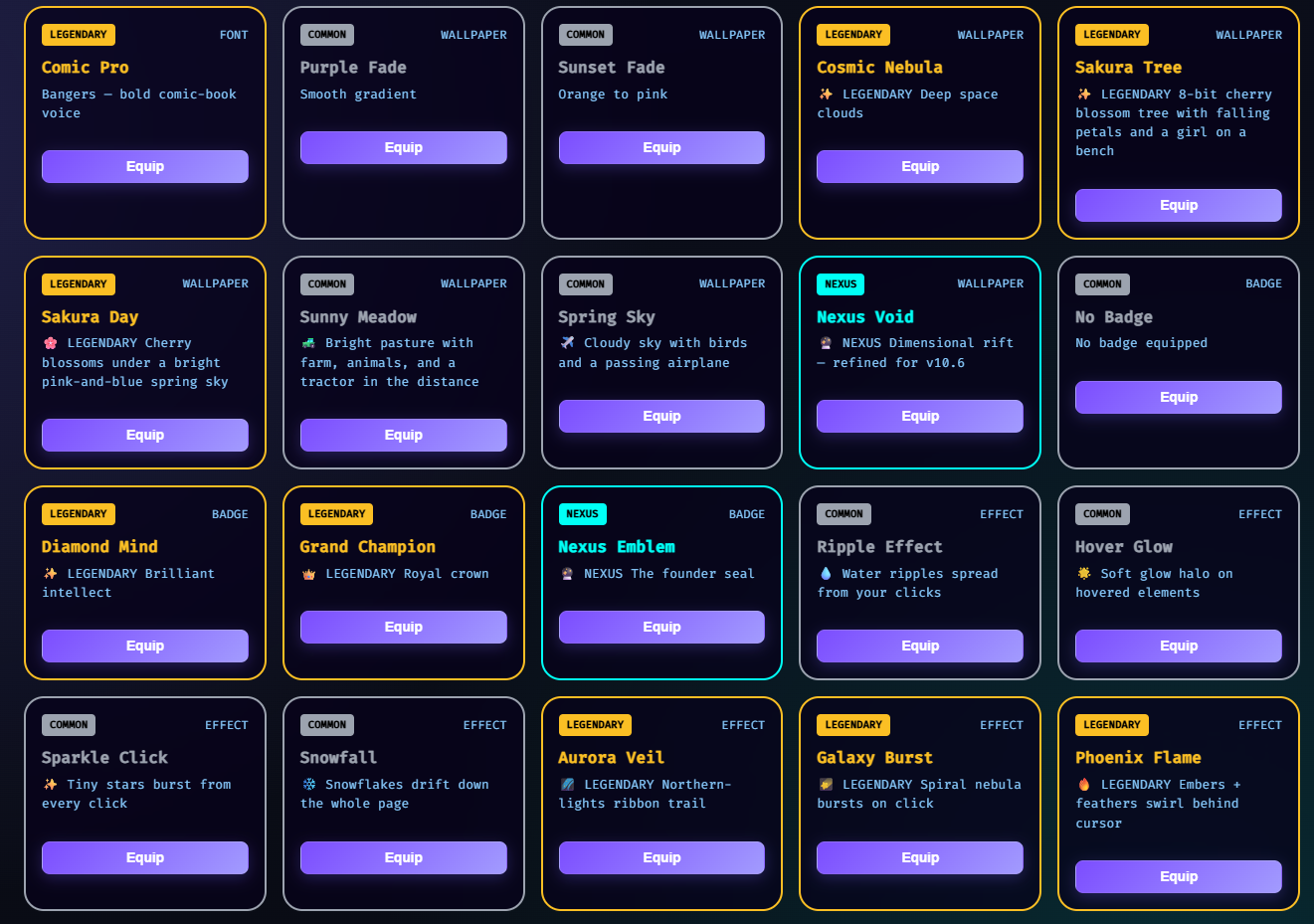
Shop, inventory, and customization.
Buy fonts, wallpapers, cursors, effects, and badges with credits you earn studying — then equip them from one organized inventory grid. Real customization, not stickers.
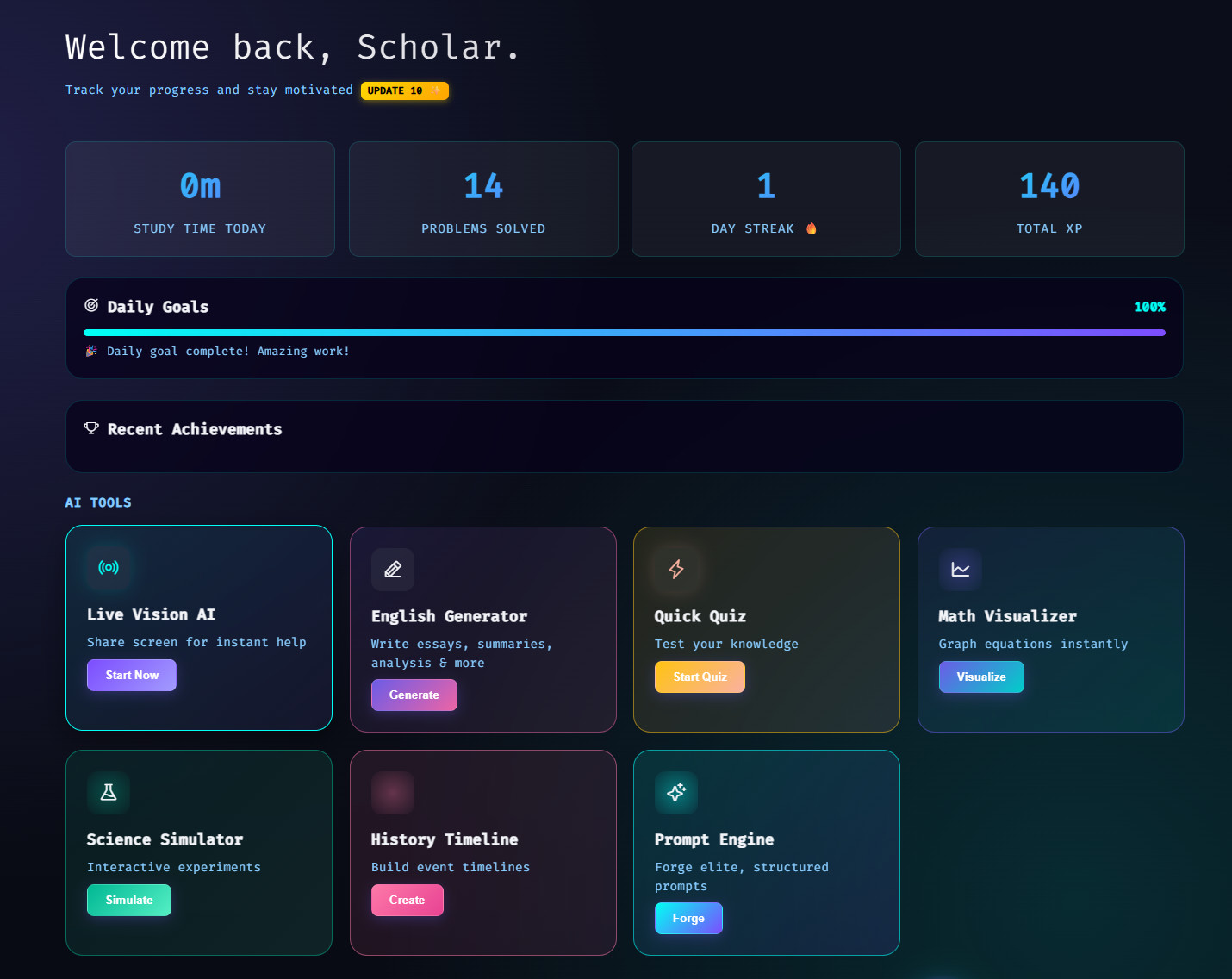
Every AI tool, one launcher.
The Command Center is where you fire off Live Vision, generate essays, run a Quick Quiz, visualize math, simulate experiments, build timelines, or build a flashcard deck — all from one panel. Tutor Mode guides you instead of just handing over answers.
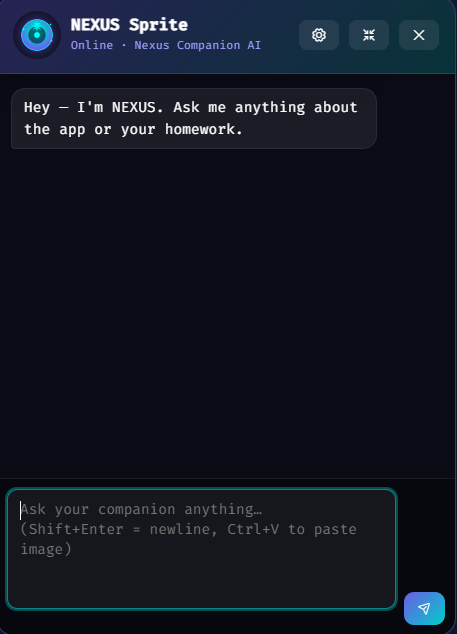
A companion that boosts your study.
NEXUS Sprite — a real-time study buddy you can link to whatever you're working on. Encouragement, hints, and a calm presence on long sessions so the work doesn't feel like a grind.
FEATURES
Everything You Need to Succeed
From AI-powered homework help to gamified rewards, NEXUS has every tool an online student needs.
AI Homework Help
Get instant, detailed explanations for any problem. Type it, paste it, or even upload a photo of your homework.
2 Tutoring Modes
Tutor explains the concept and asks you to take the next step yourself — real Socratic teaching. Casual gives instant answers for quick checks.
Rewards & Shop
Earn credits by studying. Spend them on themes, wallpapers, cursors, badges, fonts, and legendary items in the shop.
English Writing Tools
Grammar checker, essay scorer, text summarizer, literary analysis, and rewriting coach — all powered by AI.
Scientific Calculator
Full scientific calculator with trig, logarithms, powers, constants, factorial, and more — right inside your study tool.
Smart Notebook
Take notes with a realistic notebook, drawing canvas, tags, highlights, and automatic saving — everything stays organized.
WHY NEXUS
Why not just use ChatGPT?
Honest answer: you can. The difference is NEXUS is built to teach — its Tutor Mode coaches you to the next step instead of handing over the answer, wrapped in tools made for studying, not a blank chatbot box.
Feature
NEXUS
ChatGPT Plus
Khan Academy
Socratic Tutor — teaches the next step, doesn't just answer
✓
—
✓
Live Vision — explains an on-screen problem step by step
✓
—
—
Persistent history + flashcards
✓
✓
—
AI companions with personality
✓
—
—
Reading Comprehension Sprint
✓
—
—
Quests + credits + leaderboard
✓
—
✓
Formula library + dictionary built-in
✓
—
✓
Explains problems from any web-based material
✓
partial
—
Price
Free in beta then $2/module (min 4 = $8/mo)
$20/mo
Free
PRICING
Build your own plan
No bloated tiers. Pick only the modules you want — $2/month each, minimum 4. Want everything? Check it all. Free while we're in beta.
🎉 Free during our open beta — build your plan now and pay nothing.
FAQ
Common questions
How does pricing work?
You build your own plan — pick only the modules you want at $2/month each (minimum 4, so $8/mo). The 8 modules are Math, Science, English Aid, Social Studies, Smart Notebook + Focus, AI Command Center, Shop + Companion, and Competition. Want it all? All 8 is $16/mo. Add or drop modules anytime from Settings → Manage My Plan. Right now it's all free while we're in open beta.
How does Tutor Mode actually teach?
Tutor Mode never just hands you the answer. It first explains the concept behind the problem — what's going on, why this kind of problem exists, what tool you'd reach for — then asks you to take the first step yourself. One step at a time, with feedback after each one. By the time you've worked through 2–3 problems together, the pattern actually sticks. Pro subscribers can flip to Casual Mode (instant answers) for quick checks.
How does Live Vision work — and is it allowed?
Live Vision reads whatever's on your screen — a textbook PDF, a worksheet, a graph, your own notes — and helps you understand it: it explains the concept and walks you through the steps so you can solve it yourself. It works with any web-based material because it reads the screen, not a specific platform.
Use it honestly. Live Vision is a study aid, not an answer key. Always follow your school's rules on AI assistance, and don't use it on graded tests or quizzes where outside help isn't allowed.
Do I need my own OpenAI key?
Nope — AI is built in. Just create an account and the AI features work right away through NEXUS's hosted AI; no keys, no setup. If you'd rather use your own OpenAI key (for unlimited usage), you still can — paste it in Settings → AI and NEXUS uses that instead.
Can I cancel? What if I clear my browser?
Cancel anytime from Settings → Subscription. You keep access until the end of the current billing period — no retention emails, no hoops.
What's the "backup file" you'll ask me to download?
Your account syncs to the cloud automatically when you sign in, so you can pick up on any device and clearing your browser won't wipe you out. As an extra local copy, you can also download a small .json backup (Settings → Data) — your username, progress, credits, inventory, and equipped items, with no password and no executable code. Belt and suspenders: cloud sync for convenience, the file for total control.
Ready to actually understand it?
Build your plan, create an account, and start learning in under a minute. Free while we're in beta.
NEXUS isn't charging yet — we're finishing secure accounts and billing first. Create your account and use everything free. When paid plans launch we'll email you first. No card is collected today.
No card is collected during the free beta. You'll be emailed before paid plans start.
Customization Shop
Personalize your study experience
Daily Reward Available!
Claim your reward for logging in today
0
Credits Available
Past Session
NEXUSv19.0
Welcome back, Scholar
Your AI-powered learning hub — pick up where you left off.
🔥
0
streak
💰
0
gold
LVL1
Novice0 / 500 XP
🎁
Daily Reward
Claim your gold + XP for today.
CONTINUE WHERE YOU LEFT OFF
Command Center
PRO
Citation gen, ambient sounds, flashcards, heatmap
Science Lab
Physics, Chemistry, Biology & History experiments
Customization Shop
Themes, wallpapers, cursors, companions & a daily Mystery Box
Smart Notebook
Lined paper, drawing canvas & auto-save to cloud
Your Progress
0
Problems Solved
0
Day Streak
0
Credits
0
Items Owned
Achievements
Loading achievements…
Welcome back, Scholar.
Track your progress and stay motivated v19.0 ✨
0h
Study Time Today
0
Problems Solved
0
Day Streak 🔥
0
Total XP
Daily Goals
0%
Complete 3 study sessions to reach your daily goal
Recent Achievements
AI Tools
Live Vision AI Web only
Share your screen and the tutor reads the problem. Works in a desktop or laptop web browser.
English Generator
Write essays, summaries, analysis & more
Practice
Quiz · flashcards · fix mistakes · exam sim
Graph & Explore
Plot equations · sliders · points
Science Simulator
Interactive experiments
History Timeline
Build event timelines
AI Flashcards
Turn any topic into a study deck
Debate Practice
Pick a side — the AI argues the opposite
Focus Sounds
Real ambient sounds. Tap to toggle, mix layers.
Rain50%
Storm50%
Café50%
White Noise50%
Fireplace50%
Forest50%
For College
AP Exam Prep
Practice tests & study guides for AP courses
College Essays
AI-assisted personal statement & essay help
Vision Active
TUTOR WORK
Tap Help Me and the tutor will work through your problem here — step by step, without spoiling the answer.
Straight Answer
...
Explanation
...
TOPIC
Reads any on-screen material to help you understand it. A study aid — follow your school's rules on AI help and don't use it on graded tests.
English Generator
WHAT IS THIS?
Pure writing. Pick what you need and it writes it — nothing else, no analysis, no headings, no commentary. For feedback, scoring or analysis, use English Aid.
Paragraph count applies to essays only. Word count is a hard target — leave it blank to let the length follow the request.
PROMPT GENERATOR
Describe what you want and get a paste-ready prompt for any AI. You can also paste a screenshot (Ctrl+V) and it will write the prompt from what's on screen.
GENERATED 0 PROMPTS
Debate Practice
Debate Practice
Pick a topic and a side — the AI argues the opposite, then judges who made the stronger case.
Study Session History
Your study time over the last 7 days.
📓
Digital Notebook
Your personal study journal with drawing canvas
Auto-saves as you type • Last saved: Never
Grammar: select text to check part, or check the whole page. • Concept Map: visualize any topic.
3px
AI Quiz Generator
Paste any notes or text and get an instant multiple-choice quiz.
Flashcards
Create, import, and review with SM-2 spaced repetition.
Activity History
Every problem you've worked on, organized and searchable.
Study Activity — Last 16 Weeks
LessMore
TOTAL
0
entries
THIS WEEK
0
last 7 days
TOP SUBJECT
—
0 entries
TODAY
0
entries
No history yet.
Graph & Explore
Plot any equation, drag sliders to understand it, or drop your own points
Quick Examples
Pick a shape, then drag the sliders — the graph updates live so you can SEE what each number does.
Type X and Y coordinates and click Add Point to plot a dot. Each point lands on the grid.
Science Lab Simulator
Run virtual experiments — adjust variables, watch results
Experiments
⚛ PHYSICS
🧪 CHEMISTRY
🧫 BIOLOGY
🔬
Welcome to the lab.
Pick an experiment from the left rail to start.
History Timeline
Build a custom timeline OR look up everything that happened in a year
Add Event
Quick Templates
Look Up a Year
Type any year (positive or negative for BC) and see the major events that happened that year.
QUICK YEARS
Your Timeline
📅
Add events to build your timeline
🔍
Type a year on the left and hit Search
Quick Quiz
Generating questions...
📐
Math Lab
Tools & Concept Analysis
Toolkit
Concept Board
📊
Enter a math problem to get started
Type, upload an image, or paste (Ctrl+V)
RULER
Formula Library
Pick a category on the left, copy any formula on the right.
My Vocabulary
0
Words Saved
-
Quiz Accuracy
Vocabulary Quiz
✍️
English Aid
Writing tools, library, speed typing & dictionary
Fix Grammar
Correct errors &
improve flow
Summarize
Condense any passage
Literary Analysis
Themes, tone, devices
Rewrite
Rephrase & improve
clarity
Essay Scorer
Get grade & feedback
Essay Outline
Thesis → full outline
Originality Check
Flag & rewrite weak lines
My Vocabulary
Saved words & quiz
KNOWLEDGE HUB
Literary Library
Search, save, and deep-dive any book with AI analysis.
0 saved
Book Title
AI ANALYSIS TOOLS
ANALYZE A PASSAGE
READING SPRINT
Read fast. Comprehend faster.
Paste any passage (an article, a textbook chapter, an essay). NEXUS times your read, then quizzes you on 5 questions. Score = accuracy × speed. Credits scale with score.
1. Paste your passage
2. Pick difficulty
READING TIME
0.0s
YOUR SCORE
0
DICTIONARY
Look up any word, save your favorites
Definitions, phonetics, synonyms, etymology — and earn credits with the synonym challenge.
SAVED WORDS
0
Your Saved Words
Synonym Challenge — Earn 5 Credits!
Citation Generator
Generate MLA, APA, and Chicago citations instantly.
🧬
Science Lab
Explore the wonders of Physics, Chemistry, and Biology
Experiment Input
Image Attached
Quick Topics
Analysis Results
🔬
Ready to explore science!
Enter a topic or select a quick topic to begin
🌍
Social Studies
Figures, wars, eras, civilizations, and the documents that defined them — all on demand.
Loading a fact…
Region Explorer— history, government & economy of any place
Historical Figures
Learn about influential people who shaped history
Popular Searches
Wars & Battles
Explore major conflicts and their impact on history
Notable Conflicts
Events & Eras
Discover pivotal moments and historical periods
Major Events
Civilizations & Cultures
Empires, peoples, and societies that shaped the world
Popular Searches
Documents & Speeches
Foundational texts, treaties, and addresses that changed the world
Popular Searches
🎉
Updates & Changelog
Track all improvements and additions to your study companion
🏆
Profile & Achievements
Customize your profile and track your goals & rewards
Secret: Type "NEXUS" anywhere to discover hidden items!
🏆
Leaderboard
Compete with other scholars for the top rank
Earn XP by solving problems, completing quizzes, and maintaining your study streak. Leaderboard updates in real-time.
🛍️
Customization Shop
Personalize your study experience
0
Credits Available
Daily Reward Available!
Claim your reward for logging in today
📦
Your Inventory
Manage and equip your items
0
Items Owned
💡 Suggestions
Vote on ideas or submit your own — top ideas get built first.
💬 Feedback
Tell us what's working, what's broken, or what you wish NEXUS did. It goes straight to the team — privately.
Private — only the NEXUS team sees this. Please don't include passwords or personal details.
Want to suggest a feature others can vote on? Try the Suggestions board instead.
🎓
Teaching Board
A real, deep-dive tutor conversation — full explanations, real examples, and follow-up questions until it actually clicks.
How this is different from Concept Board
The Concept Board (in Math Lab) gives one quick explanation for a single problem. Teaching Board is a full conversation: tell it anything you want to understand, it teaches it in depth with real worked examples, checks that it's landing, and you can keep asking "why", "show me another example", or "I'm still confused" for as long as you need.
🧑🏫
What do you want to learn?
Type a topic, a concept, or a question — as specific or as broad as you like.
…or have a worksheet in front of you — or want to prove you've got it?
Teaching Board
🧰
Study Tools moved
Quiz Gen and Flashcards now live in your Notebook, and Study History is on the Home tab.
Java Assistant
Debug, explain, or optimize Java code
Python Assistant
Debug, explain, or optimize Python code
Web Development Assistant
HTML, CSS, JavaScript help
General Programming
Any language or algorithm question
Screen Solve - Block Puzzle Solver
Solve visual coding puzzles via screenshot or live screen share
How Screenshot Mode Works:
Upload puzzle instructions screenshot (optional)
Upload full puzzle screenshot showing blocks and goal
AI reads instructions, counts available blocks, and solves puzzle
Instructions Screenshot
Upload or paste (Ctrl+V)
Full Puzzle Screenshot
Upload or paste (Ctrl+V)
How Screen Share Mode Works:
Share your screen showing the puzzle
AI first reads instructions to understand the goal
AI counts available blocks shown on screen
Get real-time solution using only allowed blocks
SCREEN SHARING ACTIVE
AI Analysis
⏱️
Timed Practice Test
AI-generated timed tests with instant scoring
Configure Your Test
Generating your test...
10:00
Time remaining
Results
Settings
Configure NEXUS to fit how you study.
Account & API
Username
Shown on the leaderboard and your profile. 2–32 characters.
AI Access
Hosted AI is included — just sign in and start asking. No API key, no setup, nothing to paste. Everything runs through NEXUS's secure server.
OpenAI API Key (advanced)
Only needed if you want to route through your own OpenAI account. Get your key at platform.openai.com. Stored locally on your device only.
Privacy
We don't show ads or sell your data. If you use a personal API key it stays in your browser and talks only to OpenAI. With hosted AI, prompts pass through our secure proxy to OpenAI; with a cloud account, your progress is synced to your private, access-controlled storage.
Subscription
Cancel anytime. Your access continues to the end of the current billing period.
Sign Out
End this session and return to the landing page. Your account stays intact — sign back in any time.
EmailJS — Welcome emails (Owner only)
Real welcome-email delivery for sign-ups. Setup: create a free account at emailjs.com, add an email service, build a template using {{to_name}}, {{to_email}}, {{plan_label}}, {{login_url}}, {{from_name}}. Paste the three IDs below and save.
Welcome emails NEVER include the password — only the username, plan, and a login link.
Tutoring Modes
NEXUS has two ways to help — that's it, and they never go away. Pick your default here; you can switch anytime in Settings.
Tip: Tutor Mode is the one teachers love — it helps you understand, not just finish. Live Vision always coaches step-by-step regardless of this setting.
AI Behavior
Response length
Tone
Temperature 0.5
Lower = focused. Higher = creative. Default 0.5.
Math notation preference
Notifications
Daily study reminder
Browser-only reminder (requires permission). Leave blank to disable.
Accessibility
Base font size 15px
Memory & Sessions
Tutor session length 15 min
How long your Nexus tutor keeps one conversation going. Reopen within this window and it picks up where you left off; after it lapses, a fresh session starts.
Memory retention 30 days
How far back Nexus & your Sprite remember past conversations. Older chats are forgotten. Set to 0 to remember forever.
Companion Behavior
Walk speed Normal
Emote frequency Normal
Sprite size Auto
Personality
Changes how the companion responds in chat.
Companion Memory
See what your Sprite remembers from past conversations — and clear it anytime.
Study Memory (all tabs)
NEXUS remembers who you are and what you've been working on across every tab — Math, Science, Tutor, your companion, all of it — so help feels personal. Tell it anything you want it to keep in mind.
Appearance
Language
Translates the app's navigation and labels. (AI answers stay in whatever language you ask in.)
Your companion and every AI reply will answer in this language. Core menu labels are also translated.
Wallpaper FPS
How smoothly animated wallpapers run. Lower is much lighter on your GPU and battery, but animations drift slower and less smoothly. Wallpapers always pause when this window isn't focused.
Themes, fonts, cursors, wallpapers, and click effects are all managed in the Shop & Inventory tabs.
Theme Mode
Keyboard Shortcuts
Click any binding to change it, then press your new key combo. Press Esc to cancel.
Study Defaults
Default subject on launch
Daily problem goal
10
Privacy
Data stays on your device unless you sign in to a cloud account (then it syncs to your private storage). A personal API key talks only to OpenAI; hosted AI routes through our secure proxy.
Data & History
Auto-Delete Limit
20
Oldest entries auto-deleted when limit is exceeded
Backup & Transfer
Includes settings, inventory, history, and credits. Saves as JSON.
Reset
Permanently erases everything stored in this browser. Cannot be undone.
☁️ Cloud Account beta
Your account now syncs to the cloud automatically when you sign up or sign in — no extra step. This panel is just for manually backing up/restoring or linking an older local-only account.
Made your account without an email? Link one here so you can sign in with Google, recover it, and sync across devices.
Feedback
Report a bug, request a feature, or tell us what you like — it goes straight to the NEXUS team.
Diagnostics
Checks every feature in your browser (shop items, wallpapers, cursors, companions, changelog, core functions) and reports pass/fail.
Sound Effects
Volume 50%
SilentFull
About NEXUS
Version
NEXUS AI Tutor — see footer for current version. Visit the Updates tab for the full changelog.
Built for
Students Grade 9 through college. Math, Science, English, Social Studies — full curriculum coverage with AI tutoring, companions, prompt engineering, and a virtual lab.
Confirm
Sample Heading
The quick brown fox jumps over the lazy dog.
Preview shows this item applied to your dashboard. Click the backdrop to close.
credits
Help Center & FAQ
Pick a category on the left, or search across all topics.
Getting Started
How do I create an account?
Click "Get Started" and pick a username, password, and email. Your account syncs to the cloud automatically, so your progress follows you across devices — and keeps working offline on this device too.
What can I do with NEXUS?
NEXUS offers AI-powered help for Math, Science, History, Social Studies, and English. You can solve problems, analyze concepts, take notes, and use interactive tools like the Math Visualizer and Science Simulator.
How do I navigate between sections?
Use the sidebar on the left to switch between Command Center (dashboard), subject-specific tools, and your Notebook. Each section has unique features tailored to that subject.
Shop & Credits Guide
How do I earn credits?
Earn credits by using the AI tools! Each time you solve a math problem, ask for help, or use any AI feature, you'll receive credits. Daily login rewards also grant bonus credits.
The Daily Mystery Box is a free gift you can open once a day in the Shop. It always gives you credits (75–175), and sometimes a bonus cosmetic you don't already own. It never costs credits and you can't lose anything — it's just a thank-you for studying.
What do item rarities mean?
Items come in 4 rarities: Common, Rare, Epic, and Legendary. Higher rarity items are harder to obtain and more exclusive!
Labs & Tools
What is the Math Visualizer?
The Math Visualizer graphs equations on a coordinate plane. Enter equations like y=x^2 or y=sin(x) to see them visualized. Find it in Command Center!
How do I use the Science Simulator?
The Science Simulator offers 3 interactive experiments: Pendulum Motion, pH Balance Testing, and Electric Circuits. Each shows formulas, concepts, and example problems to help you learn.
What is the History Timeline Builder?
Build custom timelines by adding historical events with years and descriptions. Or use pre-built templates for WWII, American History, or Ancient Civilizations to study major events.
How does the Notebook work?
The Notebook features realistic lined paper, auto-save, timestamp insertion, and a full drawing canvas! Use text formatting tools, draw diagrams, and everything saves automatically to localStorage.
Achievements & Secrets
How do achievements work?
Complete goals like solving problems, maintaining streaks, and collecting items to earn credit rewards. Check the Achievements tab to see your progress!
What are Nexus items?
Nexus items are secret legendary items hidden as easter eggs. Type "NEXUS" on your keyboard to discover them! Each discovery rewards 750 credits.
Can I customize my profile?
Yes! Click your profile picture in the Achievements tab to choose from 25 avatar options. Other users can view your profile on the Leaderboard!
Troubleshooting
My data is not saving!
When you're signed in, your progress saves to your cloud account and locally on this device. If saving fails: check you're signed in (Settings → Account), make sure you're not in incognito/private mode, and check your connection. Your cloud copy restores automatically on next sign-in.
How do I reset my progress?
Use Settings → Data to export a backup first, then use the reset/delete options there. Don't clear browser storage by hand — with a cloud account your data would just re-sync, and without one you'd lose everything permanently.
The AI isn't responding to my questions
Signed-in accounts get hosted AI automatically — no API key needed. If the AI isn't responding: check you're online and signed in, then try again in a minute. Power users with their own OpenAI key in Settings → Account & API should verify the key is valid and has credit. Still stuck? Email support@nexusasc.com.
Privacy & Your Data
What data does NEXUS collect?
Your username, email, date of birth (to confirm age), and your study progress. Study questions you ask are sent to OpenAI to generate the answer — that's the AI provider we use. We never sell your data and there are no ads. Full details are in the Privacy Policy and Terms.
I'm under 13 — can I use NEXUS?
Yes, with a parent or guardian's permission. Signup asks for a parent email and consent when your date of birth shows you're under 13. Parents can email support@nexusasc.com anytime with questions about their child's account or to request its data or deletion.
How do I get a copy of my data, or delete it?
Settings → Data lets you export a full backup of your account as a file you keep, and delete your local data. To fully delete your cloud account and its data, email support@nexusasc.com from your account email.
Billing & Plans
Is NEXUS free?
Yes — everything is free during the beta, and no card is ever collected. When paid plans launch (modules at $2/mo each, 4-module minimum), we'll email every account first. Nothing is charged without you explicitly signing up for a plan.
Will I be able to cancel?
Yes. When paid plans go live, you'll be able to cancel anytime from Settings → Manage My Plan, effective at the end of the billing period. Billing questions: support@nexusasc.com.
Accessibility Statement
NEXUS is built to be usable by every student. The app supports full keyboard navigation with visible focus indicators, honors your system's reduced-motion preference, and offers a dyslexia-friendly font and compact-UI option in Settings. Core views were self-audited against WCAG 2.2 AA in July 2026 with automated (axe-core) and manual checks.
Accessibility is ongoing work. If anything is hard to use with your assistive technology, email support@nexusasc.com — reports get fixed with priority.
Still need help?
Email us and a human replies within one business day.
Free during beta. Join the waitlist and we'll email you when paid plans launch — no card needed.
NEXUS ACCESS
$4.50/mo
Math, Science, English, Social Studies. Tutor Mode only.
RECOMMENDED
NEXUS PRO
$6.00/mo
Everything in Access + shop, themes, all modes, achievements & leaderboard.
NEXUS Access Monthly$4.50
Free during beta — this is the price when paid plans launch.
Includes Math, Science, English, Social Studies (Tutor Mode).
Owner Access
Enter the special pin code to unlock owner privileges. Limited to 5 users total.
Companion
Nexus Companion AI
Link companion to…
Companion Settings
When off, the companion stays barely visible until you summon it or link it to a session.
Image attached — sends with your next message
🍅 Focus25:00
Dictionary Browse
Pick a letter to see common words. Click a word to look it up.
Quests
Complete tasks for credits. Resets hourly, daily, weekly.
Loading quests...
STEP 1 OF 6
Welcome to NEXUS
Privacy Policy
Cancel subscription?
Your access will continue until the end of the current billing period. After that you'll lose Pro features (companions, achievements, leaderboard, command center, inventory).
Before you go:
Your saved data, history, and inventory stay on this device.
Export a backup from Settings → Data so you can resume anywhere.
You can resubscribe anytime at the same price.
Suggestions & Roadmap
Pitch a feature, browse what others want, see what we're already building.
Submit a suggestion
Save a backup of your account
When you're signed in, your account syncs to the cloud automatically — so you can switch devices and survive a browser-clear. This downloadable backup is an extra offline copy you fully control.
WHAT THE BACKUP IS
A small .json text file (under 100KB) containing your account settings + progress. It is not malware and contains no executable code — it's just a list of your stats and equipped items. Your password is NOT stored in the file.
WHY YOU NEED IT
Signed in, your cloud account restores your progress on any device. This file is your safety net if you study signed out or want an offline copy — load it back anytime via Settings → Data → Import.
SAFE TO KEEP
Save the file to your Documents folder, email it to yourself, or drop it in a cloud drive (Google Drive, iCloud, Dropbox). Anywhere is fine — the file is small and harmless.
You can always grab one from Settings → Data → Export.